I Setup Coralogix RUM for an Online Store in 10 Minutes
3/9/2026
9 min read
I have recently been working on a huge launch for my wife's company. One aspect of this was setting up her online storefront for people to purchase the hardware she manufactures. This store is hosted by Odoo, but we want to have the same observability that the web applications have. Mainly the Real User Monitoring and Session Recording for debugging and business insights. The craziest part is that it took me less than 15 minutes to get all this up and running!
I need to preface this with the fact that what I've come up with here doesn't just work on Odoo. It works on Shopify, Squarespace, and any other e-commerce provider that lets you add javascript to the head of your pages.
With that said, let's get started.
§Real User Monitoring (RUM)
Anyone that knows me or has seen my previous blog posts on observability knows that I'm a huge fan of Coralogix. In my opinion it's one of the best solutions out there right now. I even participated in a case study that they published on their website if you want to know more about how I've used it at a very large scale.
Coralogix has a feature called Real User Monitoring or "RUM". This is basically some client side javascript that lets you instrument webpages served to your users. It includes things like webvitals and more. However, the most interesting feature is their "Session Recording" feature which allows you to playback user interactions to see what users are doing on your webapp and how they are interacting with things. It links this to console logs on the client side and server logs and traces via otel tracing. Its super powerful for debugging. If a user tells you they saw an error, you can go to the session and see what they did to get that error and dig all the way down the stack to see why that error occurred. As I said, super powerful and valuable.
Now, my wife's company sells hardware that works with their product IgorBox on an e-commerce solution. They happen to use Odoo for this, but Odoo is a SaaS and we don't have very good insight into what's happening on the site. At least not like she does with her own webapps that are fully integrated into Coralogix. I got to thinking, can I add RUM to the storefront so we can do session recording and get deep insights on what's going on in the store?
I set out on a quest to see if I could do this.
§Setting up RUM
The first thing we needed was to setup the RUM integration on Coralogix. You do this by going to "Integrations" in coralogix and selecting "Real User Monitoring".
From there you click on "Add New" and follow the prompts to get your api key created (USE A DISCREET KEY FOR RUM... THIS IS SENT TO THE CLIENT CODE AND IS GETTABLE BY THE END USER!). At the end of this process it will give you some initialization code and examples. Don't worry about the npm install @coralogix/browser or npm install -g @coralogix/rum-cli stuff. We won't be using that here because we don't have the source files for the store application.
You should have something like this:
import { CoralogixRum } from "@coralogix/browser";

CoralogixRum.init({
  public_key: "cxtp_yourkey...",
  application: "YourApp",
  version: "<your application version>",
  coralogixDomain: "US1",
});
and some example context and label stuff (we'll get to that later).
§Installing RUM on the Odoo Website
This is where I'm going to get Odoo specific, but as I said, if you use Shopify or Squarespace there are ways to do this there too. Just look for "Add custom HTML" or "Add custom javascript" to your store.
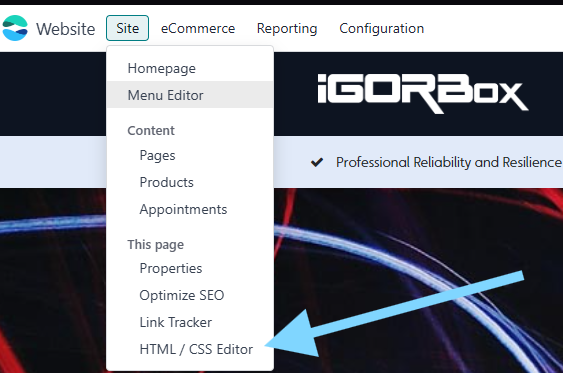
Ok in Odoo, I go to the website I want to alter and I click on "Site" -> "HTML / CSS Editor".
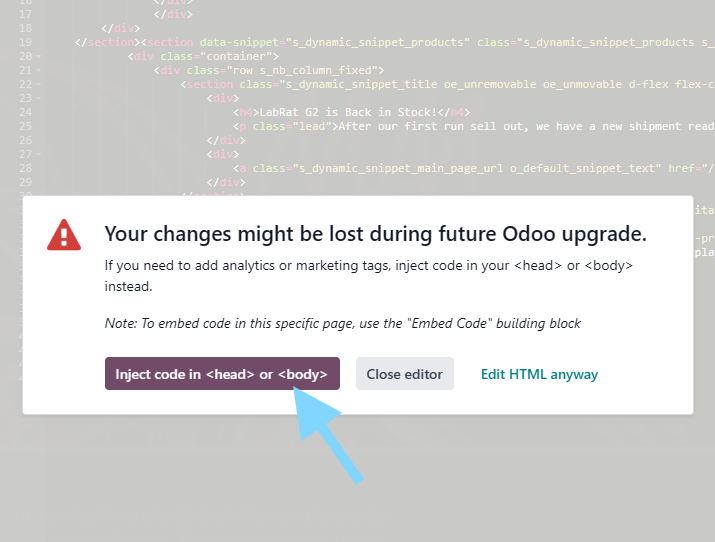
That pops up a warning and I click on "Inject code in <Head> or <Body>"
This will open an edit window with the head and body injection boxes. We want to do all this in the head of the document.
The first thing we need to do is add RUM to the website:
<script src="https://cdn.rum-ingress-coralogix.com/coralogix/browser/3.2.0/coralogix-browser-sdk.js"></script>This line adds the CDN version of RUM to be loaded right away. The next thing we need to do is initialize RUM with the code you got from Coralogix but with a minor tweak. We need to wrap it in a <script></script> tag like this:
<script>
  window.CoralogixRum.init({
    public_key: "cxtp_yourkey...",
    application: "YourApp",
    version: "1",
    coralogixDomain: "US1",
  });
</script>
This will initialize and start running RUM on all your webpages managed by Odoo.
That will work, but it's missing the all important session recording. To enable Session recording we need to add the SessionRecordingConfig to the initializer:
<script>
  window.CoralogixRum.init({
    public_key: "cxtp_yourkey...",
    application: "YourApp",
    version: "1",
    coralogixDomain: "US1",
    sessionRecordingConfig: {
      enable: true,
      autoStartSessionRecording: true,
      recordConsoleEvents: true,
      sessionRecordingSampleRate: 100,
    },
  });
</script>
This extra config will cause every session to be recorded. This may chew through quota though so you can tune the sample rate or even write some custom javascript to only start the recording in certain circumstances. We don't have enough traffic to worry about this... yet.
So the basic setup looks like this in the <head> section text editor:
<script src="https://cdn.rum-ingress-coralogix.com/coralogix/browser/3.2.0/coralogix-browser-sdk.js"></script>
<script>
  window.CoralogixRum.init({
    public_key: "cxtp_yourkey...",
    application: "YourApp",
    version: "1",
    coralogixDomain: "US1",
    sessionRecordingConfig: {
      enable: true,
      autoStartSessionRecording: true,
      recordConsoleEvents: true,
      sessionRecordingSampleRate: 100,
    },
  });
</script>
Hit save.. and hard refresh the page and you should see sessions flowing in Coralogix!
§A note on multiple loads
It's not advisable to initialize RUM more than 1 time per page load. There are guards in the javascript for this but you could inadvertently clear some context on the reinit. So its a good idea to wrap all this in a guard like this:
<script src="https://cdn.rum-ingress-coralogix.com/coralogix/browser/3.2.0/coralogix-browser-sdk.js"></script>
<script>
  if (!window.__cx_rum_inited) {
    window.__cx_rum_inited = true;
    window.CoralogixRum.init({
      public_key: "cxtp_yourkey...",
      application: "YourApp",
      version: "1",
      coralogixDomain: "US1",
      sessionRecordingConfig: {
        enable: true,
        autoStartSessionRecording: true,
        recordConsoleEvents: true,
        sessionRecordingSampleRate: 100,
      },
    });
  }
</script>
This will only run the init one time.
§Advanced Usage with Odoo
So even though this all worked well, I wasn't satisfied. I wanted more! I want it to track the user session and track logged in users so I can see what that user does.
The first thing I needed to do was figure out how to get the user context data from the website.
After some digging around the internet and watching the network console, I discovered that there's an api for this at /web/session/get_session_info. This will return the session info for the given web session, including the user's info.
Here's the javascript function I used to set the required info I need:
(async function refresh() {
  try {
    const res = await fetch("/web/session/get_session_info", {
      method: "POST",
      headers: { "Content-Type": "application/json" },
      credentials: "same-origin",
      body: JSON.stringify({ jsonrpc: "2.0", method: "call", params: {} }),
    });
    const data = await res.json();
    const info = data?.result;
    const uid = info.uid;
    const partner_id = info.partner_id;
    const name = info.partner_display_name || info.name;
    const username = info.username;
  } catch (e) {
    // ignore
  }
})();
This can then be applied to RUM like this:
(async function refresh() {
  try {
    const res = await fetch("/web/session/get_session_info", {
      method: "POST",
      headers: { "Content-Type": "application/json" },
      credentials: "same-origin",
      body: JSON.stringify({ jsonrpc: "2.0", method: "call", params: {} }),
    });
    const data = await res.json();
    const info = data?.result;
    const uid = info.uid;
    const partner_id = info.partner_id;
    const name = info.partner_display_name || info.name;
    const username = info.username;

    // add context to RUM
    window.CoralogixRum.setUserContext({
      user_id: `odoo_partner:${partner_id}`,
      user_name: name,
      user_email: username,
    });
    window.CoralogixRum.setLabels({
      ...window.CoralogixRum.getLabels(),
      odoo_uid: uid,
      odoo_partner_id: partner_id,
    });
  } catch (e) {
    // ignore
  }
})();§Optimize with a Cache
The problem I had with the way I was adding the user data to RUM had me feeling a little dirty. I'm making an extra api call for every page load. I don't want to do that. If a user is logged in, I just want to cache the data to prevent browsing around the website from feeling sluggish. So I implemented a simple caching mechanism using the browser local storage.
The way it works is that it looks to see if the user data is in the local storage and then checks to see if it is "expired". If its there and not expired it uses that. If not, it does the api call, loads the cache and then sets the context.
Here's the full bit of code we are running to capture session info for people using the webstore now:
<script src="https://cdn.rum-ingress-coralogix.com/coralogix/browser/3.2.0/coralogix-browser-sdk.js"></script>
<script>
  if (!window.__cx_rum_inited) {
    window.__cx_rum_inited = true;

    window.CoralogixRum.init({
      public_key: "cxtp_...",
      application: "yourstore",
      version: "1",
      coralogixDomain: "US1",
      sessionRecordingConfig: {
        enable: true,
        autoStartSessionRecording: true,
        recordConsoleEvents: true,
        sessionRecordingSampleRate: 100,
      },
    });

    const CACHE_KEY = "odoo_session_info_cache_v1";
    const CACHE_TTL_MS = 30 * 60 * 1000; // 30 minutes

    function readCache() {
      try {
        const raw = localStorage.getItem(CACHE_KEY);
        if (!raw) return null;
        const obj = JSON.parse(raw);
        if (!obj || !obj.cachedAt) return null;
        if (Date.now() - obj.cachedAt > CACHE_TTL_MS) return null;
        return obj;
      } catch {
        return null;
      }
    }

    function writeCache(info) {
      try {
        localStorage.setItem(
          CACHE_KEY,
          JSON.stringify({
            cachedAt: Date.now(),
            uid: info.uid,
            partner_id: info.partner_id,
            name: info.partner_display_name || info.name,
            username: info.username,
            is_public: !!info.is_public,
          }),
        );
      } catch {
        // ignore storage failures
      }
    }

    function clearCache() {
      try {
        localStorage.removeItem(CACHE_KEY);
      } catch {}
    }

    function applyToCoralogix(cached) {
      if (!cached || cached.is_public) return;

      // Use partner as primary "customer" id
      window.CoralogixRum.setUserContext({
        user_id: `odoo_partner:${cached.partner_id}`,
        user_name: cached.name,
        user_email: cached.username,
      });

      window.CoralogixRum.setLabels({
        ...window.CoralogixRum.getLabels(),
        odoo_uid: cached.uid,
        odoo_partner_id: cached.partner_id,
      });
    }

    // 1) Apply cached immediately (fast path)
    const cached = readCache();
    if (cached) applyToCoralogix(cached);

    // 2) Refresh cache if missing/expired (or you can always refresh in bg)
    if (!cached) {
      (async function refresh() {
        try {
          const res = await fetch("/web/session/get_session_info", {
            method: "POST",
            headers: { "Content-Type": "application/json" },
            credentials: "same-origin",
            body: JSON.stringify({
              jsonrpc: "2.0",
              method: "call",
              params: {},
            }),
          });
          const data = await res.json();
          const info = data?.result;

          if (!info) return;

          // If user is public, clear cache; otherwise cache + apply
          if (info.is_public) {
            clearCache();
            return;
          }

          writeCache(info);
          applyToCoralogix(readCache());
        } catch (e) {
          // ignore
        }
      })();
    }
  }
</script>